“Winkeys is way to go if you're switching from Windows to Mac.”
Tim Fairhurst, Software engineer
Instantly make your MacOS keyboard behave like Windows. It maps Win+D, Alt+Tab, Ctrl+Shift+Esc, and more so you keep your muscle memory on macOS.
“Winkeys is way to go if you're switching from Windows to Mac.”
Tim Fairhurst, Software engineer
“Switched from Windows. Works as expected.”
Alex Whitmore, Product designer
“It does the job. I can use my windows shortcuts on my mac now.”
Ronak Viroja, Developer
“Great app. If you're switching from Windows to Mac, this is a must-have.”
James Croft, IT consultant
“Just moved to Mac. My $10 was well spent.”
Emily Ashworth, Analyst
“Really useful. Hoping for Win+Left/Right split soon.”
William Pendleton, Engineer
“I have a mac mini for home server. This was perfect app for me.”
Charlotte Byrne, IT consultant
“Simple and it works.”
George Hargreaves, Developer
“Must have app for new Mac users. Few shortcuts are still missing.”
Sophie Marchant, Support lead
“Exactly what I needed.”
Nathan Ellery, Freelancer
“Winkeys is way to go if you're switching from Windows to Mac.”
Tim Fairhurst, Software engineer
“Switched from Windows. Works as expected.”
Alex Whitmore, Product designer
“It does the job. I can use my windows shortcuts on my mac now.”
Ronak Viroja, Developer
“Great app. If you're switching from Windows to Mac, this is a must-have.”
James Croft, IT consultant
“Just moved to Mac. My $10 was well spent.”
Emily Ashworth, Analyst
“Really useful. Hoping for Win+Left/Right split soon.”
William Pendleton, Engineer
“I have a mac mini for home server. This was perfect app for me.”
Charlotte Byrne, IT consultant
“Simple and it works.”
George Hargreaves, Developer
“Must have app for new Mac users. Few shortcuts are still missing.”
Sophie Marchant, Support lead
“Exactly what I needed.”
Nathan Ellery, Freelancer
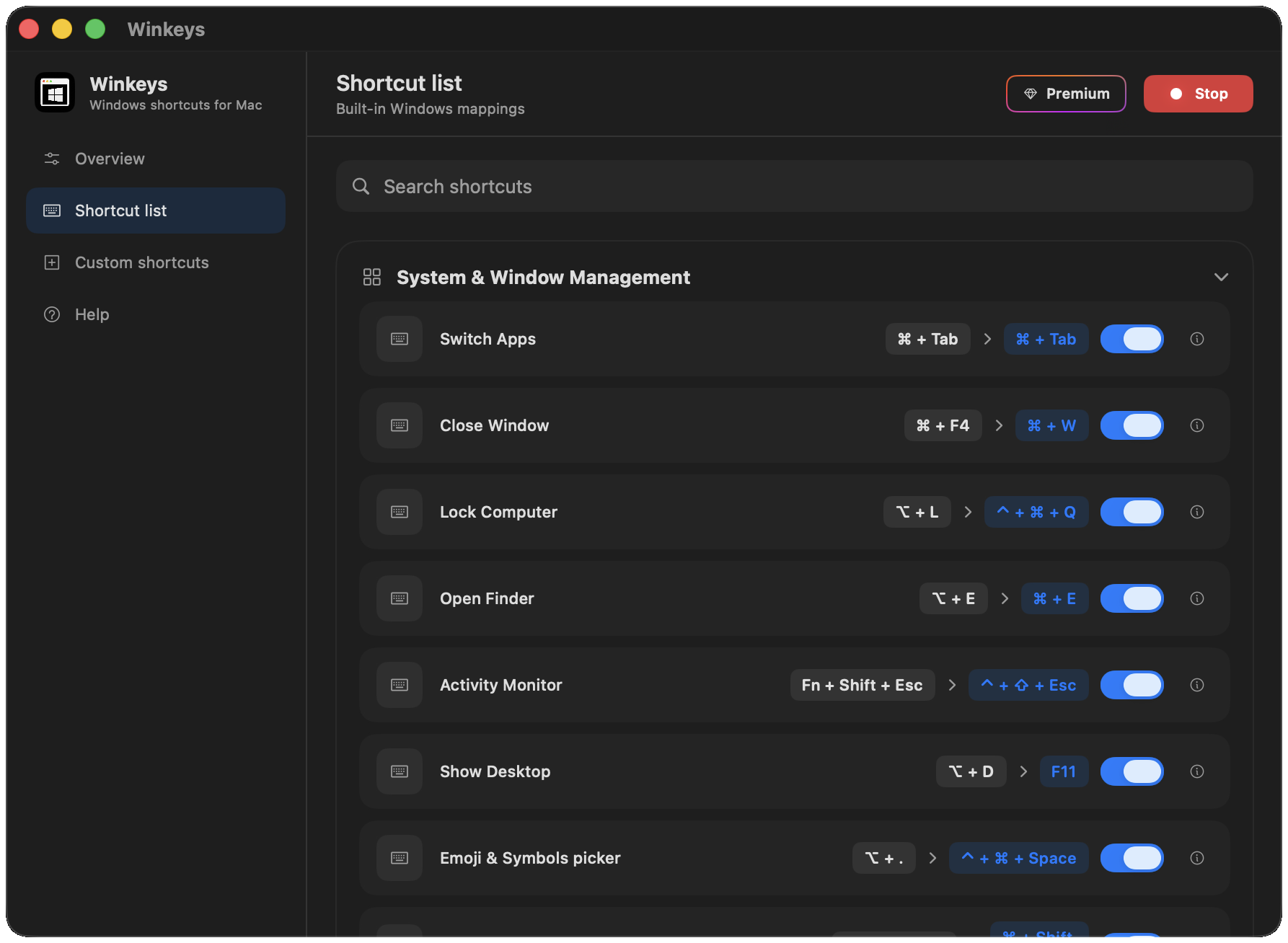
Navigate macOS like you're still on Windows.
Copy, paste, and edit with Windows shortcuts.
Switch tabs and navigate browsers effortlessly.
Open, save, and manage files instantly.
Command Panel, Toggle Terminal, Toggle Chat Window.
Snap and resize windows with Win+Arrow keys, just like on Windows.
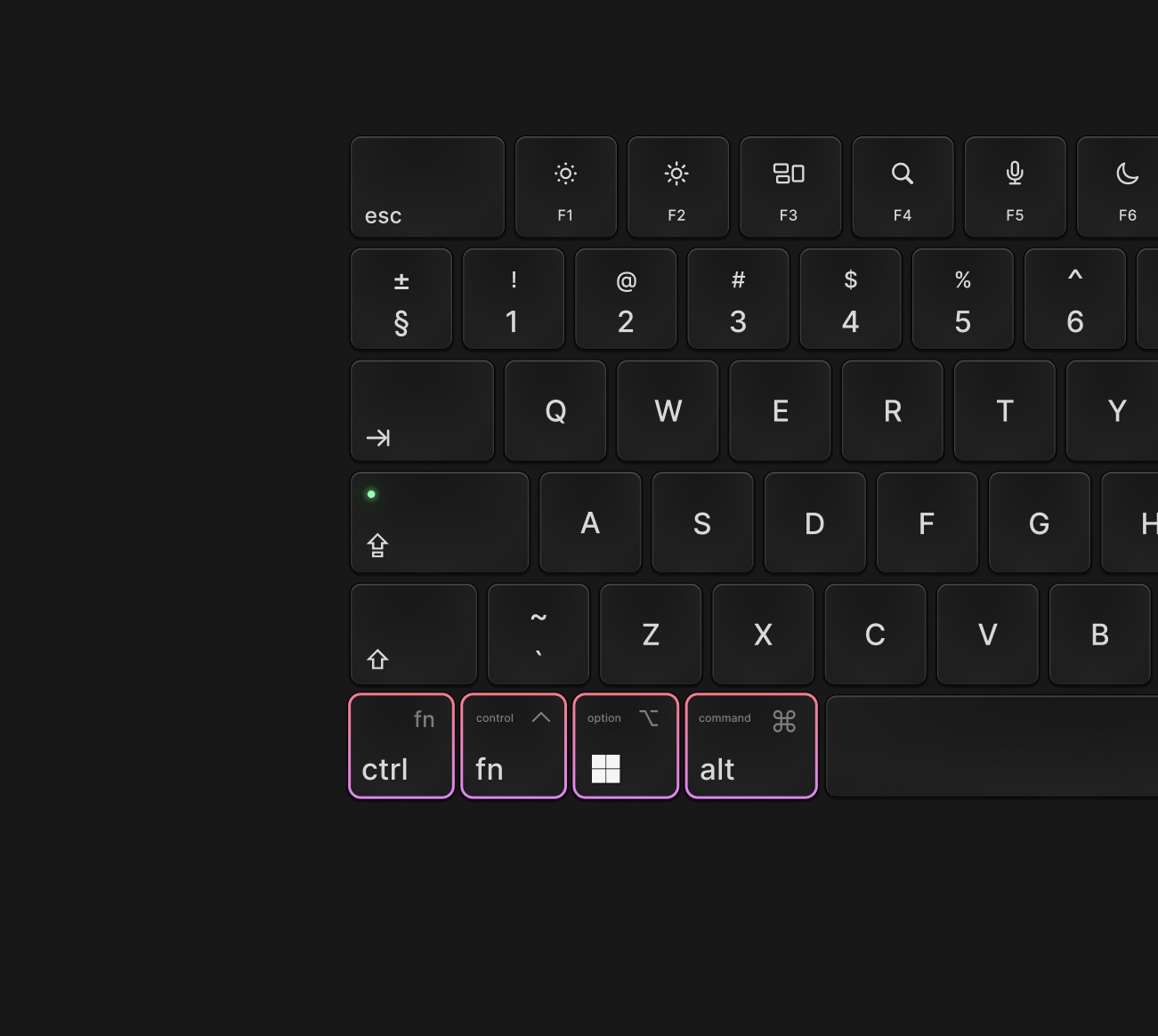
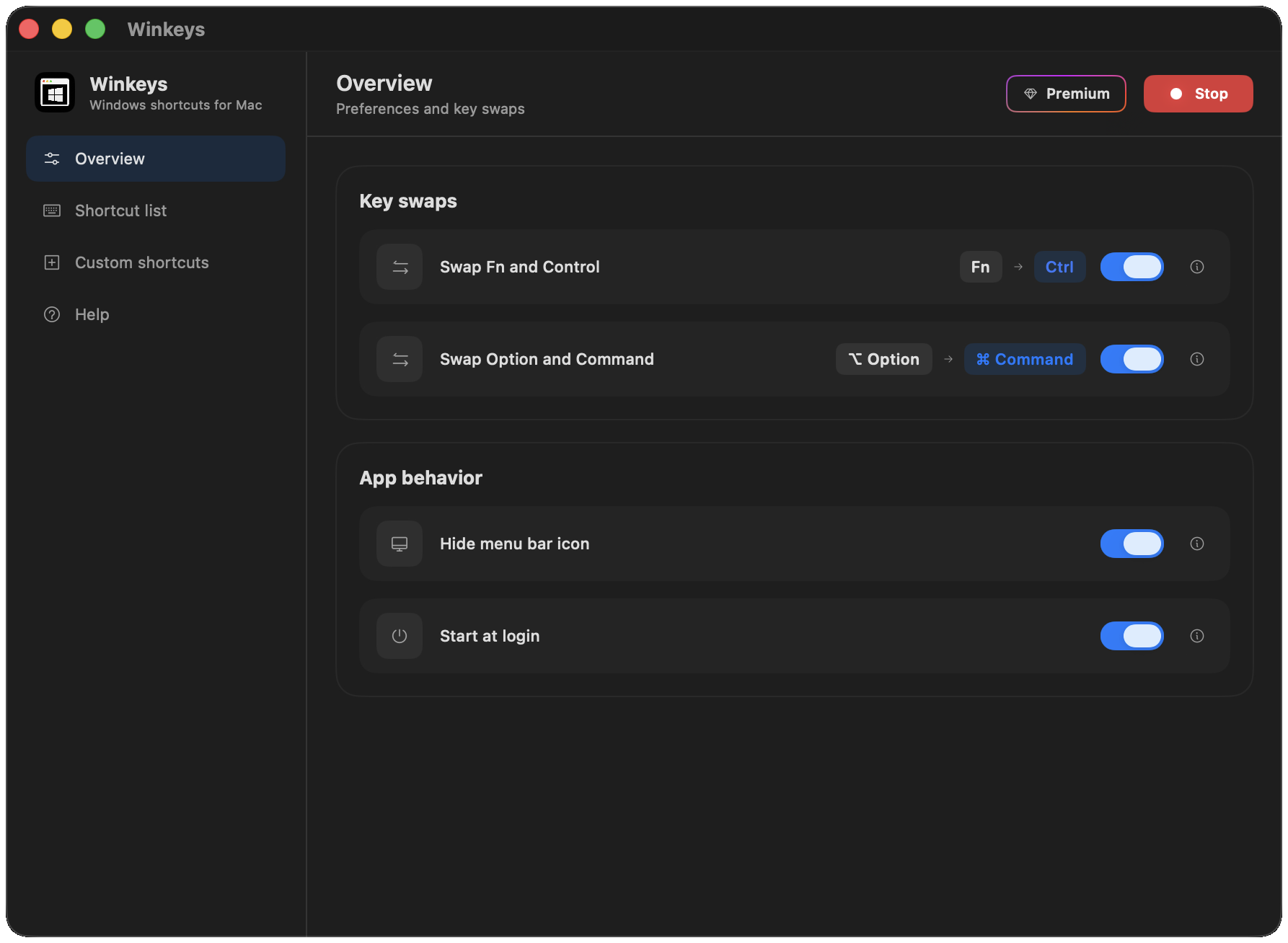
Your fingers dont have to learn a new OS. To achieve the exact behavior as Windows, swap the keys at the same place as Windows.
 Wave goodbye to
 From Reddit
Real comments from the r/macapps community.
This little app is insanely well made. I tried it and bought the paid version. Totally worth it.
Does the job. Great app.
I use Windows for work and a MacBook Air personally, so switching between the two constantly messed with my muscle memory. I’d use Windows shortcuts on my Mac and Mac shortcuts on Windows.
Switched from Windows. Works well.
Such a small problem, but it was driving me crazy. I use a Mac mini with a Windows keyboard and Winkeys makes everything feel natural again. Love it.
Muscle memory back. Nice one.
Okay, I genuinely didn't think I needed this. I got a Mac mini and kept my old mechanical Windows keyboard. Winkeys fixed that. I can finally stop thinking about whether I need Ctrl, Cmd or Option every five seconds.
Bought this on discount. It's genuinely helped me with the shortcut problem.
Solid app. Shortcuts just work.
Mac mini + Winkeys = sorted.
Fixed Ctrl/Cmd confusion in minutes.
Great for switching between Windows and Mac.
Does what it says. No fuss.
If you’re a Windows user who just switched to a Mac, get this. I went from constantly fighting my muscle memory to barely thinking about it.
Simple and it works. Recommend.
Exactly what I needed after moving to Mac.
This little app is insanely well made. I tried it and bought the paid version. Totally worth it.
Does the job. Great app.
I use Windows for work and a MacBook Air personally, so switching between the two constantly messed with my muscle memory. I’d use Windows shortcuts on my Mac and Mac shortcuts on Windows.
Switched from Windows. Works well.
Such a small problem, but it was driving me crazy. I use a Mac mini with a Windows keyboard and Winkeys makes everything feel natural again. Love it.
Muscle memory back. Nice one.
Okay, I genuinely didn't think I needed this. I got a Mac mini and kept my old mechanical Windows keyboard. Winkeys fixed that. I can finally stop thinking about whether I need Ctrl, Cmd or Option every five seconds.
Bought this on discount. It's genuinely helped me with the shortcut problem.
Solid app. Shortcuts just work.
Mac mini + Winkeys = sorted.
Fixed Ctrl/Cmd confusion in minutes.
Great for switching between Windows and Mac.
Does what it says. No fuss.
If you’re a Windows user who just switched to a Mac, get this. I went from constantly fighting my muscle memory to barely thinking about it.
Simple and it works. Recommend.
Exactly what I needed after moving to Mac.
No subscriptions. Future updates included.
Core shortcuts, simple setup:
Everything in Free, plus:
Fill out the form and we'll open your email app to send it to windowsshortcutsmac@gmail.com.
Download the .dmg, install the app, enable standard function keys in macOS Settings, grant Accessibility when prompted, then press Start. If Start does not work, quit with Cmd+Q, reinstall, and grant Accessibility again. Full screenshots are in the setup guide.
This step ensures the app can fully remap your keys.
If it does not work after the first install, repeat carefully or follow the video walkthrough on the homepage FAQ section.
Here's our product video with a full setup walkthrough:
If the video doesn't load or play, contact us and we'll help you get set up.
With Winkeys and default key swaps, press Option+D (⌥ + D) for Show Desktop, the Windows Win+D action. Without the app, macOS typically uses F11. See every Windows→Mac mapping on the shortcuts page.
Winkeys shows the keys you press with Swap Fn/Control and Swap Option/Command on (Ctrl→Fn, Win→⌥, Alt→⌘). Original is the native macOS shortcut without the app. Both columns are listed for each shortcut on the shortcuts reference page.
Open the app from the macOS menu bar (keyboard icon), then press Cmd + Q. Closing the window alone leaves it running in the background so shortcuts keep working.
Default preferences may swap keys. For example, with Swap Fn and Control on, Fn + C copies instead of Ctrl + C. Open Preferences and uncheck the swap option if you want physical Ctrl for copy/paste.
Also confirm Accessibility is enabled and the app status shows Active. Enable “Use F1, F2, etc. keys as standard function keys” in System Settings.
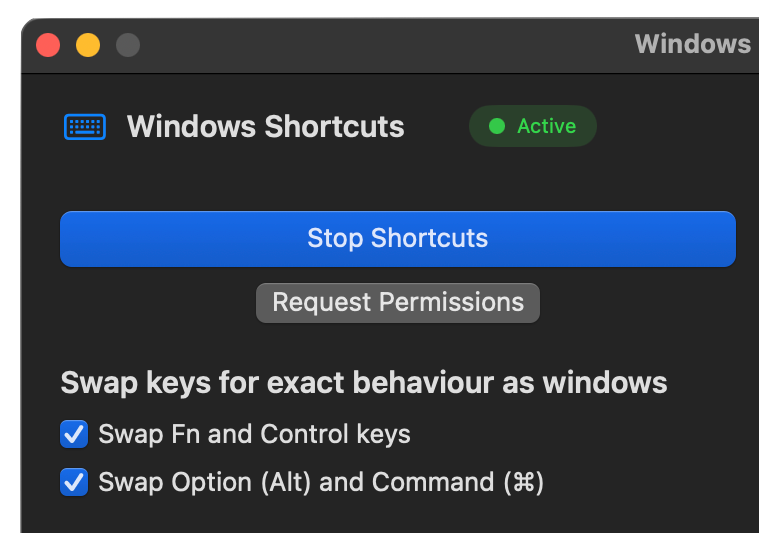
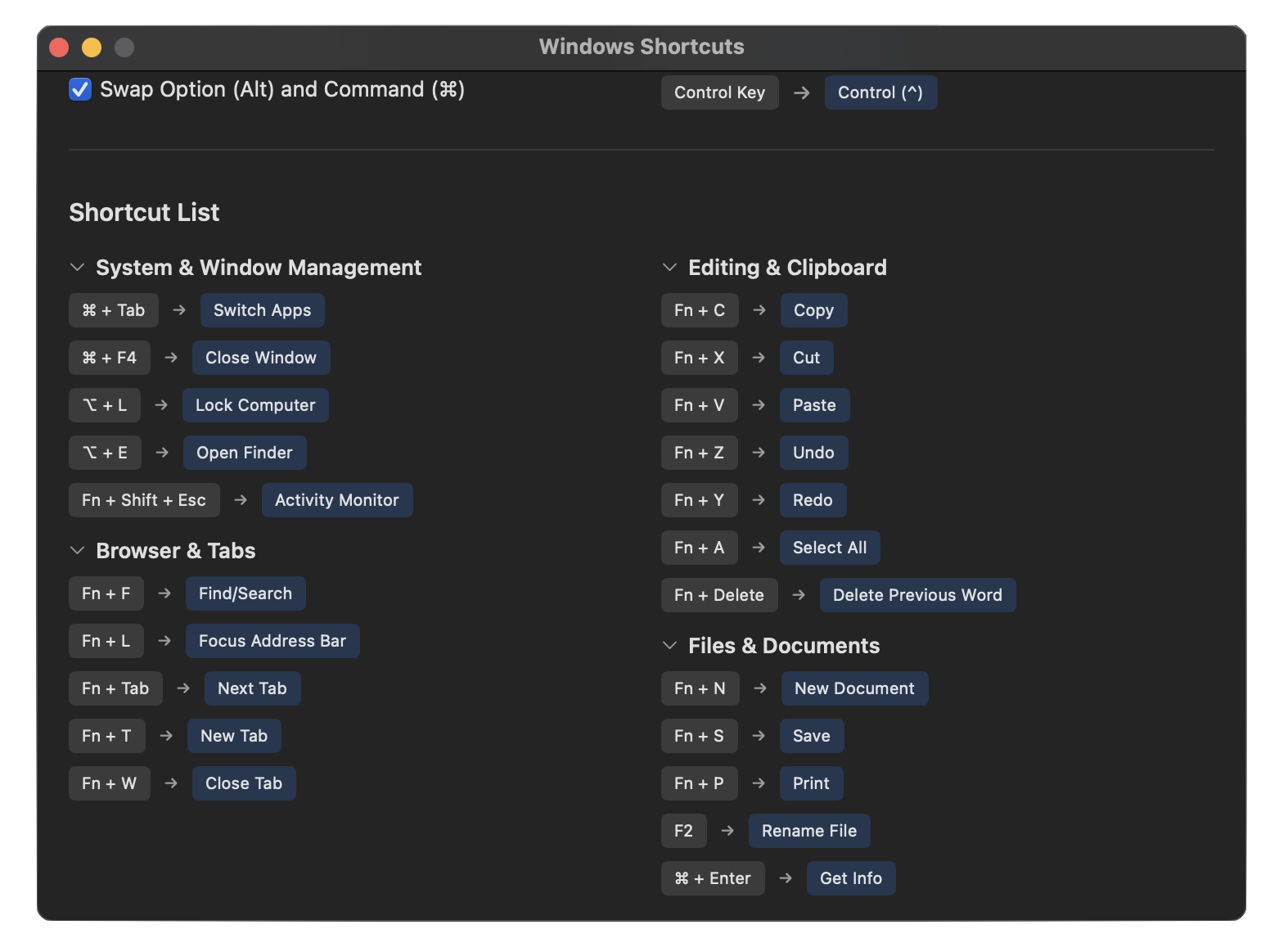
Common Windows shortcuts work, including Ctrl+C/V/X/Z, Ctrl+A/S/F, Ctrl+T/W, Alt+Tab, Win+E, Win+D, Win+Shift+S, and more across system, browser, editing, and files. Premium adds terminal, Cursor/VS Code editor shortcuts, and window snapping. See the full shortcuts page for every mapping.
The app includes 54 shortcuts across system, editing, browser, files, terminal, and editor workflows. With default settings, press fn where you see Ctrl below.
System & Window Management
Editing & Clipboard
Browser & Tabs
Files & Documents
TerminalPremium
Editor ShortcutsPremium
Window SnappingPremium
See the full reference on the shortcuts page.
Yes for most Windows switchers. Karabiner is a general remapping toolkit. Winkeys: Windows Shortcuts for Mac ships ready-made Windows→Mac shortcut mappings with a simple UI, so you do not write JSON rules just to get Ctrl+C and Alt+Tab back.
On the homepage pricing section, choose Basic (free download) or Premium (lifetime unlock). The shortcuts page Download button also jumps to pricing so you can pick a plan.
Follow the step-by-step setup guide with screenshots, or contact support from the website. A Medium walkthrough is also linked for additional detail.
Follow this step-by-step guide: Setup guide · How to use Windows keyboard shortcuts on a Mac, step-by-step guide